

Download digital goods
Like any other email, this template can be fully personalized using the drag-and-drop email editor for seamless branding.
What’s Pre-Configured in the Template:
System Fields Included – Website name and assigned specific fields.
Default Content – Pre-set details for smooth digital product delivery.
How to Customize:
Modify or Remove Fields – Adjust system properties as needed.
Use the Drag-and-Drop Editor – Easily refine layout and design.
Enhance Messaging – Optimize clarity and engagement for a polished experience.
A simple yet effective way to ensure your digital products are delivered seamlessly!

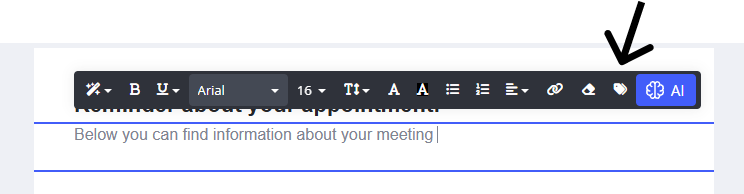
To add any further fields to the system email template you can do so by selecting the text editor when typing and click the Tag icon. The tag icon will then display the specific fields you can add to the system template as shown below.
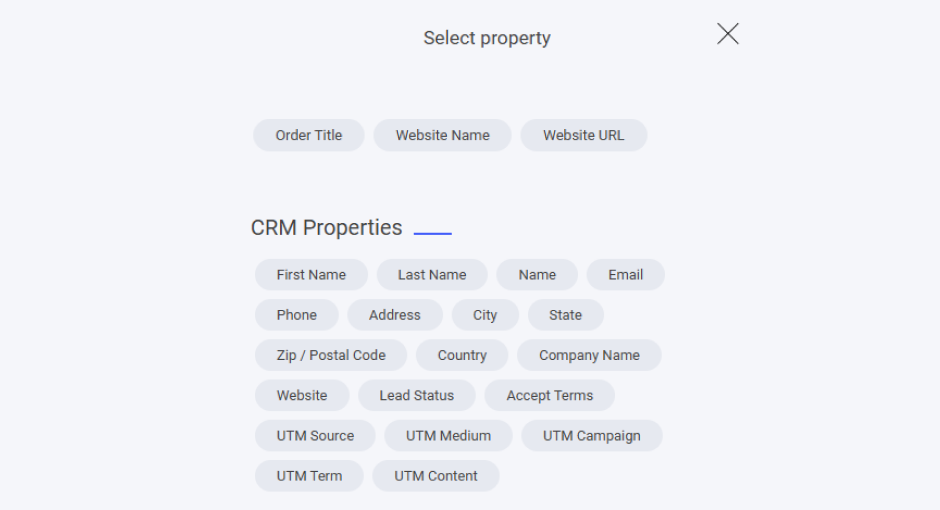
Here you will see all the specific fields allocated to the download digital goods system email.
Also all CRM properties that can be added to the email too. Note if you have any custom properties you have created they will be listed here too.
Last updated