

Getting Started
Getting started on your blog is simple!
Steps to Begin:
Navigate to the "Pages" Menu – Find the section where all website pages are managed.
Click on "Blog" – Open the blog setup and editing interface.
Customize Your Blog Layout – Adjust design, settings, and organization.
Start Adding Posts – Write engaging content to attract and retain readers.
With just a few clicks, you’ll be on your way to building a valuable blog!
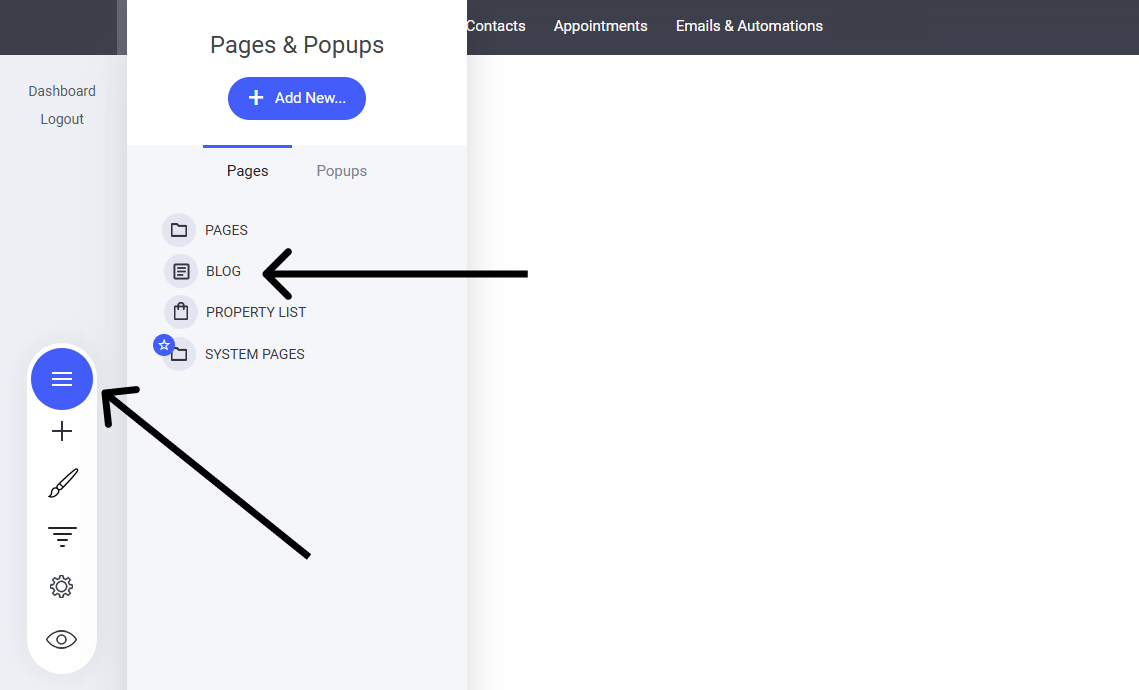
This will now open the main blog listing page where you can add new blogs and more.

From here, you can:
Filter to see All, Published, Drafts, or Trash articles.
Add posts
Delete selected posts
Change the Blog Settings
See the list of all your articles including comments, author and published date
Clone an article
Preview and article
Last updated